New on RevView: Full Exam Simulation, Study Library, and Smarter Quiz Navigation
RevView now offers a structured 150-item Civil Service Exam simulation, flexible question navigation, a searchable Study Library, and an improved results experience.
New on RevView: Full Exam Simulation, Study Library, and Smarter Quiz Navigation
We have released a major set of improvements to make your Civil Service Exam review more organized, flexible, and closer to a real testing experience.
Whether you want a short focused quiz, a full exam simulation, or a self-paced way to study questions and explanations, RevView now gives you more ways to prepare.
Take the Full Civil Service Exam Simulation
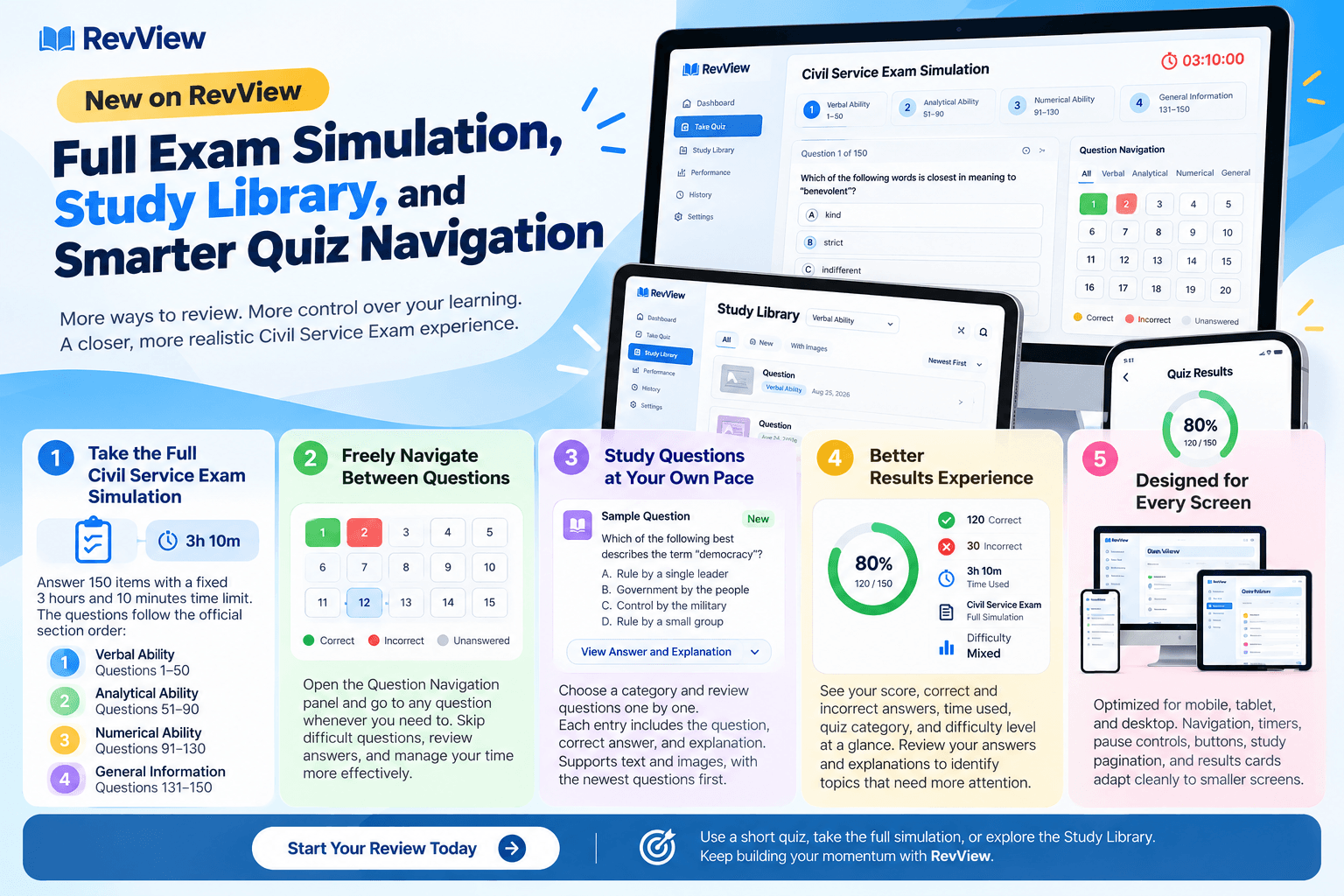
You can now take a complete 150-item Civil Service Exam simulation with a fixed 3 hours and 10 minutes time limit.
The questions follow a structured order so your exam experience feels more organized:
- Verbal Ability: Questions 1–50
- Analytical Ability: Questions 51–90
- Numerical Ability: Questions 91–130
- General Information: Questions 131–150
Questions are selected randomly from RevView’s question bank, so each attempt can give you a fresh review experience.
The full exam is ideal when you want to test your focus, pacing, and readiness for a longer Civil Service Exam session.
Freely Navigate Between Questions
You no longer need to answer questions strictly one at a time.
During a quiz, you can open the Question Navigation panel and move to any question whenever you need to. This makes it easier to:
- Skip difficult questions and return to them later
- Review previously answered questions
- Manage your time more effectively
- Answer easier questions first
The navigation also gives you a quick visual overview of your progress:
- Green questions are answered correctly
- Red questions are answered incorrectly
- Neutral questions are still unanswered
For full exam simulations, questions are grouped by section so you can easily identify the Verbal, Analytical, Numerical, and General Information portions of the exam.
Study Questions at Your Own Pace
We also introduced the new Study Library.
Instead of taking a timed quiz, you can now choose a category and review questions one by one at your own pace. Each study entry includes:
- The question
- The correct answer
- The explanation
Questions are sorted with the newest entries first, helping you see recently added review material immediately.
The Study Library supports text-based questions as well as questions with images, answer images, and explanation images. It is designed to help you understand the reasoning behind every answer—not just memorize it.
Better Results Experience
The quiz results page has also been improved to make your performance easier to understand at a glance.
After completing a quiz, you can now clearly see:
- Your overall score percentage
- Total correct answers
- Total incorrect answers
- Time used
- Quiz category or scope
- Difficulty level
You can then review your answers and explanations to identify which topics need more attention before your next attempt.
Designed for Every Screen
These updates were also refined for mobile, tablet, and desktop users.
Navigation, timers, pause controls, buttons, study pagination, and results cards now adapt more cleanly to smaller screens. This means you can continue reviewing comfortably whether you are using a phone, tablet, or computer.
Keep Building Your Momentum
Consistent practice is one of the best ways to prepare for the Civil Service Exam.
Use a short quiz when you have limited time, take the full simulation when you want to test your endurance, and use the Study Library when you want to understand questions in more detail.
Start your next review session today and keep moving closer to your goal.